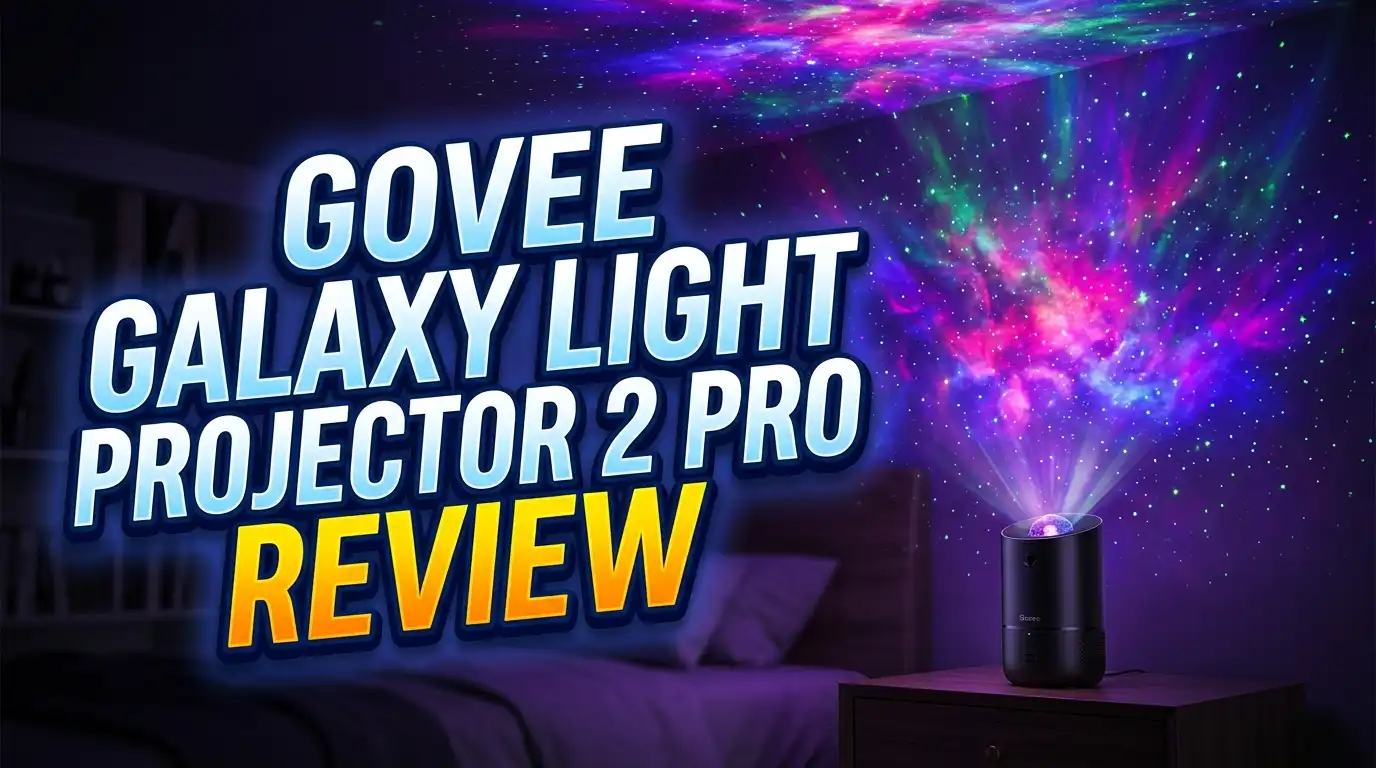
Govee Galaxy Light Projector 2 Pro Review 2026: Is This the Best Star Projector?
Are you looking for a galaxy projector that actually delivers on its promise? The Govee Galaxy Light Projector 2 Pro has taken the star projector market by storm. It packs a 4MP HD lens, Matter smart home support, and a 230 lux brightness rating into one sleek unit. But does it live up to the hype?
I spent weeks testing this projector in my bedroom, living room, and even my home office. I pushed every feature to its limit. I tested the app, the speaker, the laser effects, and the disk projections. In this review, I break down everything you need to know before you spend your money. I cover design, performance, sound quality, smart home features, and much more.
Whether you want a relaxing sleep aid or a stunning party centerpiece, this projector promises to deliver. Keep reading to find out if it truly earns its premium price tag.
Key Takeaways
- The Govee Galaxy Light Projector 2 Pro uses a 4MP high definition lens that projects sharp, vivid images from 8 included film disks. The projections cover up to 301 square feet with a 90 degree wide angle throw.
- Matter connectivity sets this projector apart from the competition. You can link it to Google Home, Amazon Alexa, and Apple HomeKit in seconds. The Govee Home App gives you full control over scenes, timers, and brightness levels.
- The built in Bluetooth speaker is surprisingly decent for background music, podcasts, and white noise. It includes 50 ambient sound options for relaxation and sleep.
- Brightness is a strong point at 230 lux. The Class 1 laser stars look amazing even in partially lit rooms. The disk projections, however, perform best in a dark environment.
- The cooling fan noise is a real concern. It kicks in after about 20 to 30 minutes and can be loud enough to wake light sleepers. This is a notable drawback for bedtime use.
- At around $130 to $150 on Amazon, this projector sits in the premium price range. It delivers excellent quality, but budget shoppers may want to explore other options first.
Govee Galaxy Light Projector 2 Pro: Design and Build Quality

- 4MP High-Definition Lens with True-to-Life Rendering: Govee star projector lights...
- Upgraded 90° Wide-Angle Design: The enlarged lens increases the projection angle by...
Last update on 2026-07-01 / Affiliate links / Images from Amazon Product Advertising API
The Govee Galaxy Light Projector 2 Pro adopts a modern capsule style design. It moves away from the football shape of older Govee models. The unit measures 9.37 x 6.41 x 5.82 inches and weighs 4.4 pounds. This is a large projector compared to compact options like the Pococo or Orzorz.
The build quality feels premium and solid. The plastic body has a smooth matte finish that looks clean on any nightstand or shelf. A separate rubberized stand comes included. This stand lets you adjust the projection angle from ceiling to wall.
Four physical buttons sit on top of the unit next to the disk tray. These buttons handle basic controls like power, brightness, and laser toggling. One small complaint is that these buttons do not glow in the dark. Finding them in a pitch black room requires some fumbling.
The packaging deserves a mention too. Govee uses high quality materials and polyethylene foam to protect the unit inside a stylish box. It would make a great gift for anyone who loves ambient lighting.
4MP HD Lens: How Sharp Are the Projections?
The headline feature of this projector is its 4 megapixel high definition optical lens. This lens projects images from the 8 included film disks with impressive clarity. Colors appear vivid. Details stay sharp even on larger walls and ceilings.
The projector delivers 230 lux of brightness. This is brighter than most star projectors in this price range. You get solid color saturation in dark rooms. However, ambient light from lamps or windows does wash out the disk projections noticeably.
Most of the detail in each disk image sits around the outer edges of the projection circle. The center can look slightly empty. This becomes more obvious the farther you place the projector from the surface. A distance of 5 to 8 feet gives the best balance of size and detail.
The 8K ultra high definition rendering from the disk images looks stunning on white or light colored ceilings. Darker surfaces absorb more light and reduce the overall impact. Still, this is one of the sharpest disk based projectors available right now.
8 Film Disks: What Scenes Do You Get?
Govee includes 8 film disks with the projector. These disks slide into the top tray easily. Each disk displays a different celestial scene. You get nebulae, galaxies, star fields, and cosmic cloud formations.
The disks come packaged in a compact booklet format. This is much better than individual plastic cases. It keeps your disks organized and easy to store. Swapping disks takes just a few seconds.
One drawback is that the disks have no labels showing what each one depicts. Unless you recognize specific nebulae, you will not know what you are looking at. It is a missed opportunity for an educational element.
These new square format disks are not compatible with older Govee models. Replacement disks are also hard to find for purchase right now. Some Amazon reviewers report that the disk images can fade over time with heavy use. This is something to keep in mind if you plan to use the projector daily.
Class 1 Laser Stars: The Best Feature
The Class 1 laser star effects are the highlight of the Govee Galaxy Light Projector 2 Pro. These lasers create tiny star dots that scatter across your ceiling and walls. They look incredible.
What makes these lasers special is their dynamic behavior. They do not just spin in a boring circle. Different scene modes activate different laser patterns. Some lasers glow bright while others stay dim. Some move quickly. Others drift slowly. The effect looks like dancing fireflies rather than predictable dots.
The lasers are bright enough to see in a partially lit room. You do not need total darkness to enjoy the star effect. This makes the projector useful during movie nights, gaming sessions, and casual hangouts.
The scene modes in the Govee app control how the lasers behave. You can combine lasers with disk projections or use them separately. This flexibility gives you dozens of different visual combinations to match your mood.
Top 3 Alternatives for Govee Galaxy Light Projector 2 Pro
1. POCOCO Galaxy Star Projector

- Unveil the Stars Like Never Before: Experience the cosmos in stunning detail with our...
- Promote Restful Sleep with Gentle Lighting: Designed with your well-being in mind, the...
Last update on 2026-07-01 / Affiliate links / Images from Amazon Product Advertising API
The POCOCO is a compact, rechargeable disk based projector. It weighs much less than the Govee and offers a portable design. The battery lasts up to 6 hours on a single charge. It is perfect for travel or small rooms. The projection quality is clear, and additional disk packs are widely available.
2. BlissLights Sky Lite Evolve

- Great tools at a great price
Last update on 2026-07-01 / Affiliate links / Images from Amazon Product Advertising API
The BlissLights Sky Lite Evolve is a nebula and star laser projector with WiFi app control. It works with Google Home and Amazon Alexa. It does not use disks. Instead, it generates colorful nebula clouds with moving laser stars. It is more affordable and has a smaller footprint.
3. Orzorz Star Projector Galaxy Light

- Precision Imaging & Silent Sleep Aid: 【Lab-Calibrated Night Light with Wellness...
- Expandable Cosmic Library:【HD Celestial Projection with Custom Scenes】 (1)5 premium...
Last update on 2026-07-01 / Affiliate links / Images from Amazon Product Advertising API
The Orzorz is another rechargeable disk based option. It features a sleek spherical design. The projection clarity is good, and replacement disks are easy to find. It is an excellent mid range pick for bedrooms and meditation spaces.
Smart Home Integration with Matter
The Govee Galaxy Light Projector 2 Pro supports Matter connectivity. This is a universal smart home standard that works across platforms. You can connect the projector to Google Home, Amazon Alexa, and Apple HomeKit without any compatibility issues.
Setup through the Govee Home App takes less than a minute. The app detects the projector quickly. There are no frustrating reboots or error messages. This is one of the smoothest smart home setups I have experienced with any projector.
Voice control works well. You can say “Hey Google, turn on the star projector” or “Alexa, set the projector to Cosmic Waves.” The response time is fast. Basic commands like power on, power off, and brightness adjustment all work through voice.
Matter support also means you can include the projector in smart home routines. For example, you can set it to turn on automatically at sunset and turn off at midnight. This level of automation adds real value to the product.
Govee Home App: Full Control at Your Fingertips
The Govee Home App unlocks the full potential of this projector. The on body buttons handle basics, but the app gives you access to every advanced feature.
You get 20 plus preset scene modes in the app. Each scene adjusts the laser pattern, rotation speed, brightness, and ambient sound. Favorites include Cosmic Waves and Interstellar Travel. The differences between some scenes are subtle, but each one has a distinct feel.
The app lets you customize and save up to 6 lighting scenes. You can tweak brightness, laser behavior, and rotation to create your perfect setup. This personalization feature is a big plus for anyone who likes specific mood lighting.
Sleep timers and wake up timers are built into the app. The default auto shutoff is set to 120 minutes. This timer protects the disk lifespan but can feel short during long movie nights. You can restart it easily by toggling the projector off and on again.
Built In Bluetooth Speaker and White Noise
The Govee Galaxy Light Projector 2 Pro includes a built in Bluetooth speaker. You can pair it with your phone, tablet, or any Bluetooth device. The speaker handles background music, podcasts, and audiobooks well.
Sound quality is decent for a projector speaker. You should not expect deep bass or concert level audio. But for ambient listening, it does a solid job. The mids and highs come through clearly enough for a pleasant experience.
Govee also includes 50 ambient sound options. These include themed music, nature sounds, and calming sound effects. Despite being labeled as “white noise,” there is no actual white noise track included. The sounds are more like ambient audio loops designed for relaxation.
The speaker pairs quickly and maintains a stable Bluetooth connection. You can play your own music while the projector runs its light show. This makes it a great all in one device for bedtime routines, meditation sessions, or casual room ambiance.
Brightness and Projection Coverage
At 230 lux, the Govee Galaxy Light Projector 2 Pro is one of the brightest disk based projectors available. The laser stars cut through ambient light with ease. You can enjoy the star effects even with a dim lamp on in the room.
The projection covers up to 301 square feet. This is enough to fill a standard bedroom ceiling with color. The 90 degree wide angle throw distributes light evenly across a large surface area.
Disk projections need a dark room to look their best. Even partial ambient light reduces the contrast and vibrancy of the projected images. If your room has blackout curtains, you will get the best visual experience from this projector.
Projection distance matters too. Placing the projector 5 to 8 feet from the ceiling or wall gives the sharpest results. Moving it too far back makes the center of the image look washed out. Finding the right spot takes a few minutes of adjustment, but the results are worth it.
Fan Noise: The Biggest Drawback
The cooling fan noise is the most significant downside of this projector. The fan kicks in after about 20 to 30 minutes of use. It needs to run to prevent the unit from overheating.
The fan sound is noticeable in a quiet room. If you plan to fall asleep with the projector on, this could be a real problem. Several users report being woken up by the fan’s whirring sound. Light sleepers will find this frustrating.
During movie nights, gaming sessions, or parties, the fan noise blends into the background. You will not notice it over any other audio source. The issue is specific to quiet, bedtime use.
Playing one of the 50 ambient sounds through the speaker can help mask the fan noise. You can also use an external white noise machine. But it is disappointing that a projector priced this high has not solved this motor noise issue from the previous model.
Sleep Timer and Wake Up Features
The Govee Galaxy Light Projector 2 Pro includes both a sleep timer and a wake up timer. You can set these through the Govee Home App. They give you hands free control over the projector’s schedule.
The default auto shutoff is 120 minutes. Govee says this limit helps preserve the lifespan of the film disks. You cannot extend this timer beyond 120 minutes. This means long movie watchers will need to restart the projector manually.
The wake up timer lets you set the projector to turn on at a specific time. Imagine waking up to a soft galaxy display on your ceiling. It is a calming alternative to a harsh alarm clock.
You can also integrate these timers into smart home routines through Matter, Google Home, or Alexa. Setting a “bedtime” routine that dims your lights and activates the projector is simple and effective. This automation is one of the best reasons to choose a Matter compatible projector.
Power Source and Portability
This is a mains powered projector. It requires a wall outlet to operate. There is no built in rechargeable battery. The included power cable is a standard length that works for most room setups.
Portability is limited. The 4.4 pound weight and large footprint make this projector best for staying in one spot. If you need a projector you can move between rooms or take on trips, the POCOCO or Orzorz models are better choices.
The lack of a battery is not a dealbreaker for most users. You will likely find a good spot for the projector and leave it there. A bedside table, shelf, or dedicated projector stand works perfectly.
Cable management is worth thinking about before you set up. The power cord can look messy on a clean nightstand. Routing the cable behind furniture or using adhesive cable clips keeps things tidy. A longer cord option from Govee would have been a nice addition.
Who Should Buy the Govee Galaxy Light Projector 2 Pro?
- 4MP High-Definition Lens with True-to-Life Rendering: Govee star projector lights...
- Upgraded 90° Wide-Angle Design: The enlarged lens increases the projection angle by...
Last update on 2026-07-01 / Affiliate links / Images from Amazon Product Advertising API
This projector is ideal for smart home enthusiasts who want seamless integration with Google Home, Alexa, or Apple HomeKit. The Matter support makes setup effortless. If you already use smart routines, this projector fits right in.
Bedroom decorators and ambient lighting fans will love the visual quality. The 4MP HD lens and dynamic laser stars create a genuinely immersive experience. It turns any plain ceiling into a stunning galaxy display.
This projector is not the best choice for light sleepers who need silence. The fan noise after 30 minutes could disrupt your rest. It is also not ideal for people who need a portable, battery powered option.
Buyers who value brand quality will appreciate Govee’s reputation. Govee is a trusted name in smart lighting. You get reliable customer support and software updates. The build quality matches the premium price. If you want a high end, feature rich galaxy projector for your home, the Govee Galaxy Light Projector 2 Pro delivers.
Final Verdict: Is the Govee Galaxy Light Projector 2 Pro Worth It?
The Govee Galaxy Light Projector 2 Pro earns a strong recommendation in 2026. The 4MP HD lens, 230 lux brightness, and Matter smart home support put it ahead of most competitors. The laser star effects are the best I have tested. The Govee app is polished and easy to use.
The fan noise and 120 minute auto shutoff are real drawbacks. The lack of replacement disks and the disk only projection system limit long term variety. These issues prevent it from being a perfect product.
At around $130 to $150, it offers excellent value for what you get. The build quality, smart features, and visual output justify the price. If you can live with the fan noise and prefer a stationary setup, this is one of the best galaxy projectors you can buy right now.
Overall Rating: 4 out of 5 stars.
Frequently Asked Questions
Is the Govee Galaxy Light Projector 2 Pro worth the price?
Yes, for most buyers it offers strong value. The 4MP HD lens, Matter connectivity, and premium build quality justify the $130 to $150 price tag. You get a bright, sharp projection with excellent smart home features. Budget shoppers may prefer the POCOCO or BlissLights alternatives for a lower cost entry point.
Does the Govee Galaxy Light Projector 2 Pro work with Alexa and Google Home?
Absolutely. The projector supports Matter, which means it works with Amazon Alexa, Google Home, and Apple HomeKit. You can control it with voice commands and include it in smart home automation routines. Setup takes less than a minute through the Govee Home App.
How loud is the fan on the Govee Galaxy Light Projector 2 Pro?
The fan is quiet for the first 20 to 30 minutes. After that, the cooling fan activates and produces a noticeable hum. It is loud enough to wake light sleepers in a quiet room. Playing ambient sounds through the built in speaker helps mask the noise.
Can I buy replacement disks for the Govee Galaxy Light Projector 2 Pro?
As of 2026, replacement disks are difficult to find for separate purchase. The projector comes with 8 film disks. These new square format disks are not compatible with older Govee projector models. Govee has not yet announced a separate disk accessory pack.
Is the Govee Galaxy Light Projector 2 Pro rechargeable?
No. This projector requires a wall outlet for power. It does not have a built in battery. If you need a portable, rechargeable galaxy projector, consider the POCOCO Galaxy Star Projector or the Orzorz Star Projector instead.
How far should I place the projector from the ceiling?
A distance of 5 to 8 feet gives the sharpest projection. Moving the projector too far away makes the center of the image look empty. The included stand helps you angle the lens for the best ceiling or wall coverage.