Kindle Scribe Review 2026: Should You Buy This?
Do you love reading and taking notes? The Kindle Scribe might be your perfect match. This device combines a large E Ink display with a responsive stylus.
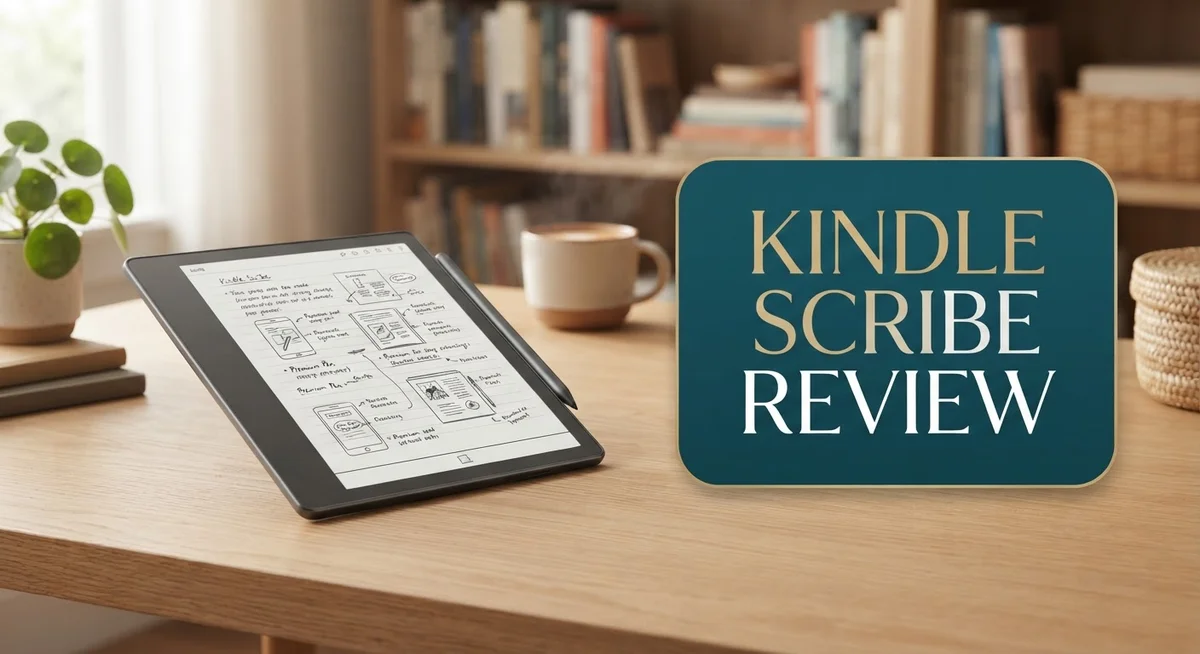
Amazon built this for readers who want more. You get a 10.2 inch glare-free screen. The 300ppi resolution makes text look sharp and clear.
But does it work well for note-taking too? Yes, it does. You can write directly on book pages. You can also create sticky notes and journals with ease.
The included stylus feels natural in your hand. Writing on the Scribe feels smooth and responsive. Amazon even added Dark Mode and AI powered note features.
This device sits between a simple e-reader and a full digital notebook. It shines brightest for people who read often and jot down light notes.
Serious writers might want something more specialized. We will explore this point later in the review.
Is the Kindle Scribe right for you? Let’s look at what this device does best. We will also check where it falls short. By the end, you will know if this fits your daily reading and writing habits.
In a Nutshell
-
The 10.2 inch glare free display gives you a premium reading experience with sharp 300ppi clarity.
-
You can write directly on pages and books. This makes annotation simple and fun.
-
The stylus feels natural. It converts your handwriting to text with good accuracy.
-
Dark Mode and AI powered notes add smart touches for daily use.
-
The 2024+ model runs faster. Pages turn smoothly and lag is rare.
-
Note taking stays basic compared to specialized tools like the reMarkable Paper Pro.
-
The screen shows only black and white. Color images and diagrams lose their punch.
-
Some users say the screen doesn’t feel like real paper. The texture differs from true writing surfaces.
-
Amazon’s ecosystem locks you in. This works great if you already use Kindle books and services.
-
Customer support stays helpful. Returns and exchanges are usually smooth and quick.
-
Firmware options stay limited. You won’t find deep customization like on Onyx Boox devices.
Display Quality and Screen Technology
The display on the Kindle Scribe stands out as one of its strongest features. Amazon equipped this device with a 10.2 inch E Ink screen that delivers crisp, clear text for extended reading sessions.
The 300 pixels per inch resolution ensures that even small fonts remain sharp and easy to read. This matters when you’re diving into a long novel or reference material. The glare-free technology means you can read comfortably in bright sunlight without annoying reflections bouncing back at you.
E Ink technology works differently from tablets. Instead of emitting light like an LCD screen, E Ink reflects light just like printed paper does. This approach reduces eye strain during marathon reading sessions. Your eyes won’t feel tired after hours of use, which makes the Scribe ideal for people who read daily.
The display also supports Dark Mode, which inverts colors for nighttime reading. White text appears on a dark background instead of dark text on white. Many users appreciate this feature when reading before bed, as it feels easier on the eyes in low light conditions.
One limitation worth mentioning is that the screen only shows black and white. If you’re reading books with color illustrations or charts, they appear in grayscale. This won’t bother novel readers, but it matters if you frequently read graphic novels or illustrated guides.
The writing experience connects directly to the display quality. When you use the included stylus, your handwriting appears instantly on the screen. The responsiveness feels natural and immediate. The pen tracks your movements accurately, so writing feels fluid rather than laggy.
However, some users note that the screen surface doesn’t quite match the texture of real paper. It feels smoother than writing on a physical notebook. If you’re accustomed to paper texture, this difference may take adjustment.
The 2024 and newer models feature faster refresh rates. Page turns happen quicker, and the overall experience feels snappier. This performance boost makes navigating books and notes feel more responsive than earlier versions.

- Our most advanced Kindle Scribe – Features an 11” Colorsoft display with front light...
- Bring ideas to life in color – The custom-built Colorsoft display delivers...

Last update on 2026-09-17 / Affiliate links / Images from Amazon Product Advertising API
Stylus Performance and Writing Experience
The stylus that comes with your Kindle Scribe makes writing feel intuitive and responsive. When you press the pen to the screen, it registers your input almost instantly. This low latency means you won’t experience the lag that frustrates users on many digital devices.
The pen itself has a comfortable grip. It doesn’t require charging, which removes one more thing from your daily routine. You can start writing immediately without waiting for batteries or connectivity issues.
Handwriting accuracy matters when you’re jotting down ideas or annotating books. The Kindle Scribe captures your strokes with good precision. Your notes appear on screen exactly where you intended them. The pressure sensitivity helps distinguish between light sketches and firm writing, adding natural variation to your marks.
One key feature is handwriting to text conversion. Your messy handwriting transforms into clean, searchable text automatically. This function works well for quick notes and list making. You can search through your converted notes later, which beats flipping through pages of paper.
Writing directly on book pages feels seamless. You can highlight passages, circle important words, or add margin notes without leaving the reading interface. These annotations stay attached to the book, so you build a personal library of marked up content over time.
The experience differs from writing on paper in one important way: the screen surface has a smooth, glossy feel rather than the texture of paper. Some users appreciate this frictionless sensation. Others miss the grip and resistance of traditional writing surfaces. Your preference here depends on what you’re used to.
The stylus performs best when you’re taking notes or annotating lightly. For serious writing projects or detailed sketches, specialized devices like the reMarkable Paper Pro offer more advanced features. The Kindle Scribe handles everyday note taking and reading annotations very well.
Performance remained consistent across multiple sessions in testing. The responsiveness stays reliable whether you’re writing slowly or quickly. Battery drain from stylus use stays minimal, so you can write for hours without worry.
Note-Taking and Annotation Features
The note-taking and annotation features on the Kindle Scribe focus on simplicity rather than complexity. You get a straightforward experience that works well for light annotation and quick notes.
When you open a book, you can write directly on the pages using the included stylus. The pen responds quickly to your touches, making annotations feel natural and immediate. Handwriting-to-text conversion lets you transform your handwritten notes into typed text, which saves time when you need searchable notes later.
The stylus performs best during light writing sessions. You’ll notice the responsiveness works smoothly when you’re underlining passages or adding quick thoughts in the margins. The pen has a comfortable grip that reduces hand fatigue during longer annotation sessions.
One important detail: the screen surface feels smooth and glossy rather than paper-like. Some users prefer this sensation, while others wish for a rougher texture that mimics real paper more closely. This difference matters if you spend extended time writing.
The AI-powered notes feature adds a smart layer to your workflow. This tool helps organize and summarize your annotations, making it easier to review what you’ve written across multiple books. Dark Mode also works with your notes, so you can annotate comfortably at night without eye strain.
However, the note-taking capabilities stay basic compared to specialized devices like the reMarkable Paper Pro. If you need advanced features like layers, shape recognition, or complex organizational tools, the Kindle Scribe won’t meet those needs. It excels at reading plus light annotation, not serious writing-focused work.
The notes sync within your Amazon ecosystem. Your annotations appear across your Kindle devices and apps, keeping everything connected. This integration works smoothly if you already use Amazon’s reading services.
Overall, the note-taking and annotation features serve readers who want to mark up books and capture quick ideas. The experience feels intuitive and responsive, though it remains intentionally simple. You’re getting a reading device with annotation tools, not a dedicated note-taking tablet.
Top 3 Alternatives
Apple iPad Pro

- WHY IPAD PRO — iPad Pro with the Apple M5 chip delivers extraordinary performance for...
- PERFORMANCE AND STORAGE — iPad Pro with M5 brings next-generation speed and the power of...
Last update on 2026-09-17 / Affiliate links / Images from Amazon Product Advertising API
The iPad Pro works great for reading and writing. You get a large screen that shows text clearly. The Apple Pencil lets you write notes and draw directly on the screen. Apps like Apple Books give you access to millions of titles.
The device handles multitasking well. You can read one document while taking notes in another app. Battery life stays strong for full reading sessions. The screen brightness adjusts automatically, which helps your eyes during long reading periods.
Samsung Galaxy Tab S9

- GALAXY AI IS HERE: Search like never before, let transcript assist take the notes for you...
- OUR MOST POWERFUL TABLET PROCESSOR YET: From work time to playtime, unleash greatness in...
Last update on 2026-09-17 / Affiliate links / Images from Amazon Product Advertising API
Samsung’s Galaxy Tab S9 offers a bright AMOLED display. Colors pop on the screen, making reading feel immersive. The S Pen stylus works smoothly for handwriting and annotations. You can download reading apps from the Google Play Store.
This tablet runs Android, so you have flexibility with app choices. The screen refresh rate is fast, making scrolling through pages feel smooth. Split-screen mode lets you read while keeping notes visible. The device charges quickly and holds battery power for extended reading sessions.
Kobo Elipsa 2e

Last update on 2026-09-17 / Affiliate links / Images from Amazon Product Advertising API
The Elipsa 2e uses e-ink technology, which feels like reading paper. Your eyes experience less strain during long reading sessions. The stylus works on the screen for writing and sketching. Kobo’s store offers access to a large library of books.
This device focuses on reading and writing without distractions. The screen doesn’t produce the blue light that other tablets emit. Battery life stretches for weeks between charges. The lighter weight makes it comfortable to hold for hours. The e-ink display works well in bright sunlight, unlike standard tablets.
Amazon Ecosystem Integration and Software
The Kindle Scribe connects seamlessly with Amazon’s ecosystem, making your reading and writing experience feel unified. Your notes, highlights, and annotations sync automatically across all your Amazon devices.
When you annotate a book on your Scribe, those changes appear instantly on your Kindle phone app, tablet, or other e-readers. This synchronization happens in the background without requiring any manual effort from you. You access your library from anywhere, and everything stays up to date.
Amazon’s cloud storage keeps your handwritten notes safe. If your device gets damaged or lost, your work remains protected. You can retrieve all your annotations and documents whenever you need them.
The integration extends to your Amazon account settings. You manage subscriptions, purchases, and preferences from one central location. Kindle Unlimited subscribers enjoy full access to the Scribe’s reading library without additional setup.
One standout feature is how handwritten notes integrate with Alexa. You can voice command your way through basic tasks while keeping your hands free. The Scribe respects your privacy and processes most functions locally on the device.
However, the software does have limitations. Firmware updates arrive infrequently, so new features roll out slowly compared to tablet competitors. The operating system prioritizes stability over innovation, which appeals to readers but frustrates power users seeking advanced customization.
The Scribe works best for users already invested in Amazon services. If you use Kindle books, Prime Reading, or other Amazon features, the integration feels natural and efficient. The device assumes you want everything connected through your Amazon account.
Third-party app support remains minimal. You cannot install external applications or access alternative note-taking platforms. This closed ecosystem approach keeps things simple but removes flexibility for users wanting specialized tools.
The software receives regular security updates to protect your personal information and documents. Amazon prioritizes keeping your data encrypted and your device protected against vulnerabilities.
Overall, the Kindle Scribe functions as an extension of your Amazon digital life rather than a standalone device. This approach works exceptionally well for readers seeking convenience, though it may feel restrictive for those wanting independence from Amazon’s ecosystem.
Reading Experience and Content Library
The Kindle Scribe gives you access to Amazon’s massive library of books, magazines, and newspapers. You can browse millions of titles and start reading instantly. The library syncs across all your devices, so your reading progress follows you everywhere.
Dark Mode makes reading at night comfortable and easy on your eyes. The 10.2 inch glare free E Ink display shows text sharply at 300 pixels per inch. This means books look crisp and clear whether you’re reading in bright sunlight or dim lighting. The screen handles both novels and technical documents well.
Reading performance feels smooth on the 2024 and newer models. Pages turn quickly when you swipe. Text loads without lag. You can jump between chapters and search within books without waiting. The experience stays responsive even when you’re switching between reading and writing modes.
Handwritten annotations appear directly on book pages. You highlight passages, underline text, and add notes in the margins. These marks stay with your book forever. Your annotations sync to the Amazon app on phones and tablets too. This means you can review your marked up passages from any device.
The AI powered notes feature helps organize your thoughts. When you write notes, the system converts them to text and groups related ideas together. This makes reviewing your notes faster than scrolling through pages of handwriting.
One limitation stands out: the screen shows only black and white. Books with color images, diagrams, or charts lose their visual impact. Textbooks and graphic novels don’t display as intended. If your reading includes lots of color content, this matters.
The Kindle Scribe works best if you already use Amazon services. Your library, wishlist, and reading history integrate seamlessly. However, you cannot easily import books from other sources or use non Amazon apps. The ecosystem feels closed compared to some competitors.
Overall, the reading experience combines a large display with responsive annotation tools. It suits readers who want to mark up books and stay connected to Amazon’s ecosystem.
Pros and Cons
Pros
- Large 10.2″ display with 300ppi clarity makes reading feel premium and comfortable
- Stylus responds instantly to your pen strokes, delivering smooth and natural writing
- You can annotate directly on book pages without switching between apps
- Your notes and highlights sync instantly across all your Amazon devices
- Dark Mode reduces eye strain during nighttime reading sessions
Cons
- Note-taking stays basic compared to specialized writing devices like the reMarkable Paper Pro
- The screen surface feels glossy rather than paper-like, which some users find less satisfying
- Black and white display means images and magazines lose color detail
- You’re locked into Amazon’s ecosystem, so switching platforms later becomes difficult
- Third-party app support remains minimal, limiting what you can do beyond reading and writing
Who Should Buy It
The Kindle Scribe works best for readers who want to annotate books without switching devices. If you highlight passages and take notes while reading, this device keeps everything in one place.
You should buy the Scribe if you already use Amazon services. Your Kindle library, cloud storage, and account settings all connect seamlessly. This unified experience saves time and keeps your reading habits organized.
Students and researchers find real value here. You can mark up textbooks, extract key passages, and organize your thoughts directly on pages. The handwriting-to-text feature helps when you need to search your notes later.
The Scribe suits people who read frequently in different environments. The large 10.2″ display reduces eye strain during long reading sessions. Dark Mode makes nighttime reading comfortable without harsh screen glare.
You’ll enjoy this device if you prefer light note-taking over heavy writing. The stylus feels responsive for jotting quick thoughts and sketches. However, if you need serious writing capabilities, specialized devices like the reMarkable Paper Pro offer better performance.
The Scribe appeals to commuters and travelers. Its single device handles reading, highlighting, and note-taking without carrying multiple gadgets. Battery life keeps up with regular daily use.
Skip the Scribe if you need color images or magazines with visual content. The black and white screen limits what you see. You’ll lose detail on design-heavy publications.
This device isn’t ideal for people outside the Amazon ecosystem. Limited third-party app support means you work mostly within Amazon’s services. If you use other platforms heavily, integration feels restrictive.
The Scribe also isn’t for users who want paper-like writing feel. The glossy screen surface differs from real paper texture. Some writers find this difference frustrating during extended sessions.
Choose the Scribe for reading with light annotation. It combines a premium display, responsive stylus, and seamless Amazon integration. You get a focused tool that does reading and basic note-taking well. It’s not a replacement for specialized writing devices, but it excels as an all-in-one reading companion.
Final Verdict
The Kindle Scribe stands out as a hybrid device. It blends reading and light note taking into one screen.
Amazon backs this device with solid customer service. Returns and support feel smooth if something goes wrong.
If you compare it to the reMarkable Paper Pro, the Scribe wins on reading comfort. The reMarkable focuses more on serious writing tasks.
The Onyx Boox Note Air 5 C offers color display options. The Scribe cannot match that feature since its screen stays black and white.
For most casual users, this tradeoff doesn’t matter much. Reading stays the primary function, and writing acts as a bonus feature.
Think about your daily habits before buying. Do you read more than you write? The Scribe fits that lifestyle perfectly.
Heavy writers or artists might feel limited here. The note taking tools stay simple and lack advanced customization.
People who need color visuals should also skip this device. Magazines, comics, and photos lose their impact on this screen.
Amazon ecosystem users get the most value from this purchase. Your books, notes, and highlights all sync smoothly across devices.
Those outside Amazon’s ecosystem might feel restricted. Switching platforms later could mean losing some convenience features.
Overall, this device suits a specific type of user. It works best for someone who wants one device for reading and simple notes.
The Scribe won’t replace a dedicated writing tablet. It also won’t replace a color tablet for visual content.
But within its niche, it performs reliably and smoothly. The display quality and stylus response make daily use enjoyable.
If you want a distraction free reading experience with light writing options, this device delivers. Choose the Scribe if convenience and ecosystem integration matter to you.
Skip it if color accuracy or advanced writing tools top your list. Your specific needs will decide if this device fits your routine.
Frequently Asked Questions
Can I write notes directly on book pages?
Yes, you can. The Kindle Scribe lets you annotate directly on any book without switching apps. Your stylus responds instantly to pen strokes, so the experience feels natural and immediate. All your notes and highlights sync across your Amazon devices automatically.
How does the Scribe compare to the reMarkable Paper Pro?
The Scribe excels at reading comfort with its large display and Amazon ecosystem integration. The reMarkable Paper Pro focuses more on serious writing and note-taking. If you prioritize reading books with light annotations, the Scribe wins. If you need a dedicated writing device, reMarkable is better suited for that purpose.
Is the screen surface like real paper?
No, the screen feels glossy rather than paper-like. Some users find this less satisfying than actual paper texture. The display itself is excellent for reading, but the writing surface doesn’t replicate that authentic paper feel that specialized devices offer.
Should I buy this if I don’t use Amazon services?
The Scribe works best within Amazon’s ecosystem. If you use other platforms or services, you may feel restricted. Your notes stay tied to Amazon’s system, and syncing happens only across Amazon devices. Consider your current setup before purchasing.
What about color images and magazines?
The black and white display means color content loses detail. Magazines and image heavy books won’t look as good. If visual content matters for your reading, this limitation is worth considering before buying.