Supernote Nomad A6X2 Review: Is It Worth Your Money?
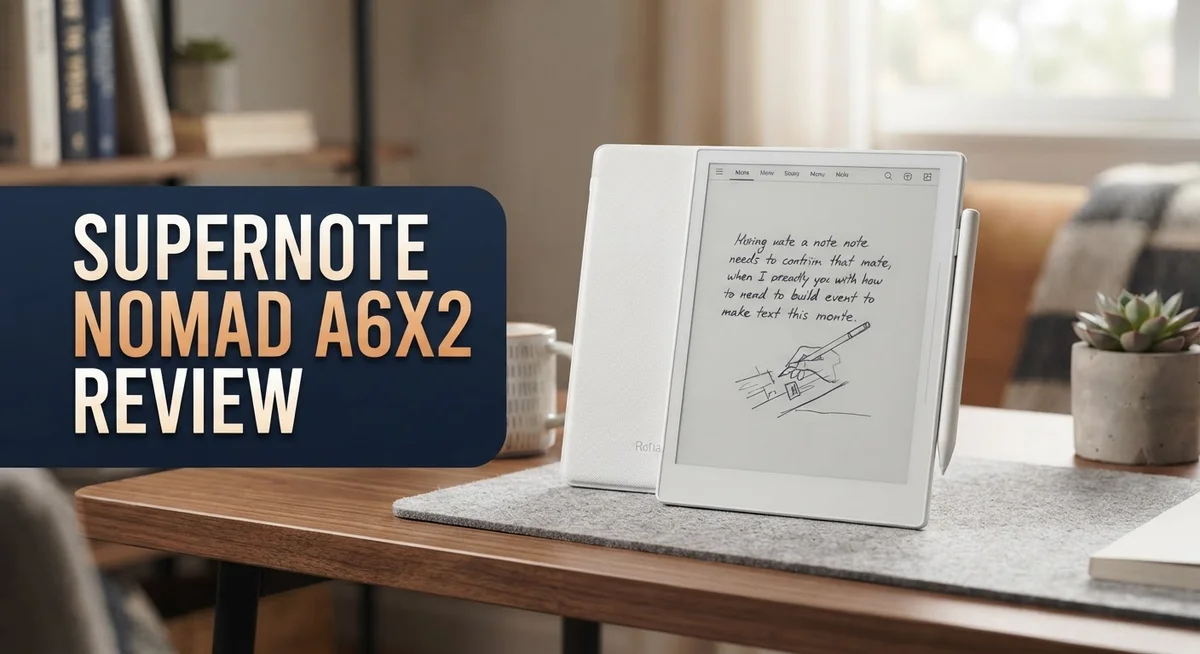
Do you love writing on paper but want a digital twist? The Supernote Nomad A6X2 might be your answer. This small e-ink tablet packs a big punch for note takers and readers alike.
It comes with a 6 inch display and 300 PPI resolution. The screen shows crisp text and smooth handwriting. Writing feels natural thanks to its ceramic nib pen.
This device stands out for another reason too. You can repair it yourself. The battery, motherboard, and microSD card all pop out and swap in easily. That means your tablet can last for years.
The Nomad also skips flashy extras. There is no home screen and no backlight. Instead, it gives you a clean, distraction free space to write and think.
Cloud syncing works well here too. You can connect to Supernote Cloud, Dropbox, Google Drive, or OneDrive. Your notes stay backed up and ready across devices.
Curious how it stacks up against the iPad, reMarkable, or Boox tablets? Let’s dive into what makes the Supernote Nomad A6X2 a standout choice for digital note taking.
In a Nutshell
The Supernote Nomad A6X2 brings a fresh take on digital note taking. Here is what you need to know at a glance.
- Writing feel comes first. The ceramic nib pen glides on the screen like a real pen on paper. This is the tablet’s biggest strength.
- Repairs are simple. You can swap the battery, motherboard, and microSD card yourself. Most tablets do not offer this freedom.
- Battery life impresses. You get long use between charges. This makes the Nomad reliable for daily writing tasks.
- The interface stays simple. There is no clutter and no home screen. This keeps you focused on writing, not app hopping.
- Cloud sync just works. You can connect to Supernote Cloud, Dropbox, Google Drive, or OneDrive without hassle.
- Some flaws remain. The pen lacks a magnetic attachment. Zooming and scrolling feel clunky on this smaller screen. There is also no frontlight for low light use.
The Nomad targets writers who want paper like feedback in a digital tool. It skips extra features to keep things distraction free. This focus makes it different from tablets like the iPad or Boox.
Display and Writing Experience
The display on the Nomad A6X2 shines when you focus on what matters most: writing. The 6 inch e ink screen delivers 300 PPI, which means text stays crisp and your handwriting looks sharp. No backlight or frontlight sits here, which keeps the screen simple and reduces glare during long writing sessions.
What really sets this device apart is the writing experience itself. The ceramic nib pen feels like a real pen on paper. Your strokes glide smoothly without that plastic scratch you get on many tablets. The feedback is immediate and natural. If you spend hours taking notes or sketching, this matters a lot.
The smaller screen does come with a trade off. Zooming and scrolling feel clunky on a 6 inch display. You might find yourself pinching and dragging more often than you’d like. Navigation takes extra steps sometimes. This is the real downside for people who want to see more content at once.
The lack of a home screen keeps things minimal. You open the app and start writing right away. No distractions. No widgets. No notifications popping up. This simplicity appeals to writers and note takers who want focus, not features.
The pen itself has critics. Some people dislike how it looks, and it cannot attach magnetically to the device. You need to carry it separately or store it in a pocket. This is a minor inconvenience, but worth knowing.
Battery life works in your favor here. You get solid use between charges, so you can take the Nomad through a full week or more of regular writing without hunting for a charger. This makes it truly portable.
Overall, the Nomad A6X2 excels at one job: giving you a paper like writing feel in a digital package. The display supports this mission perfectly. If you value writing quality over screen size and flashy features, the display experience will satisfy you. The trade offs exist, but they align with the device’s core purpose.

- Portable 8.2" E Ink Tablet for Daily Reading:At just 230g, AiPaper Mini works as a compact...
- Eye-Friendly Reading with Adjustable Warm Light:The 8.2" 292 PPI E Ink display reflects...
Last update on 2026-09-17 / Affiliate links / Images from Amazon Product Advertising API
Design and Build Quality
The Supernote Nomad A6X2 feels solid in your hand. The device weighs very little, making it easy to carry anywhere. You slip it into a bag without thinking twice about the extra load.
The build quality reflects smart engineering choices. The 6-inch e-ink display sits protected behind durable glass. This screen resists scratches and handles daily use well. The ceramic nib pen contributes to the premium feel, though some users wish it had better aesthetics.
Repairability stands out as a major design strength. You can replace the battery yourself when it ages. The motherboard comes out easily if you need repairs. The microSD card slot lets you expand storage without sending the device away. This approach respects your ownership and saves money over time.
The form factor prioritizes portability over everything else. The compact size means you actually carry it, unlike larger tablets that stay on desks. The lightweight construction makes extended writing sessions comfortable.
One design choice divides users. The lack of a magnetic pen attachment means you must hold or store the stylus separately. This feels like an oversight for a portable device. The pen doesn’t clip to the frame like competitors offer.
The minimalist design philosophy shapes every decision. There is no home screen cluttering your view. The interface stays clean and distraction-free. This appeals to writers who want focus, not features.
The ceramic nib itself deserves attention. It glides across the screen with genuine paper-like feedback. The writing experience feels natural and responsive. Some criticize the pen’s appearance, but its performance speaks louder.
The lack of a frontlight or backlight keeps the design simple. Adding these features would require extra screen layers that compromise the writing feel. Supernote chose authenticity over convenience here.
Overall, the design philosophy centers on one idea: serve the writer first. Every material choice, every removable component, and every minimalist decision points toward this goal. The Nomad A6X2 proves you don’t need flashy features to build something genuinely useful.
Battery Life and Repairability
The Nomad A6X2 puts battery life front and center in its design. You get several days of active use between charges, which means you write, sketch, and organize without constantly hunting for a power outlet. This matters most if you carry the device in a bag or use it throughout your workday.
What makes battery performance even better is the replaceable battery design. When your battery eventually ages after years of use, you don’t need to send the device away. You simply open the back, swap in a fresh battery, and keep going. This approach saves you time and frustration.
Repairability extends far beyond just the battery. The Nomad A6X2 lets you replace the motherboard and microSD card yourself too. This modular approach means you control maintenance costs and keep your device running longer. You’re not locked into manufacturer repairs or expensive service centers.
The ceramic nib pen also benefits from this repair mindset. If your nib wears down after months of heavy writing, you can get a replacement without replacing the entire pen. This practical design choice appeals to serious writers and students who use the device daily.
The build quality reflects these repair friendly choices. Materials feel solid in your hand, and nothing feels fragile or disposable. The compact form factor keeps weight low while maintaining durability. You can toss it in a backpack without worry.
This repairability focus sets the Nomad A6X2 apart from competitors. Many tablets glue components together, making repairs impossible for users. The Supernote team chose a different path. They built a device that respects your ownership and your wallet.
The trade off is minimal. You get a device that lasts longer, costs less to maintain, and gives you genuine control over repairs. For anyone frustrated by throwaway electronics, this approach feels refreshing and honest.
Top 3 Alternatives
Remarkable 2 Tablet

- THE ONLY TABLET THAT FEELS LIKE PAPER – With a paper feel never before experienced on a...
- DO YOUR BEST THINKING – reMarkable has no app store, no pop-up ads, notifications, or...
Last update on 2026-09-17 / Affiliate links / Images from Amazon Product Advertising API
The Remarkable 2 Tablet focuses on a clean, distraction-free writing experience. You get a large display that feels like paper, and the device syncs your notes to the cloud automatically. The writing latency is extremely low, which means your pen keeps up with your hand movements without lag.
This tablet works best if you want simplicity. It doesn’t run apps or have a color screen. Instead, it offers a focused environment for writing, sketching, and reading PDFs. The battery lasts for weeks, not days.
Kobo Elipsa 2E

Last update on 2026-09-17 / Affiliate links / Images from Amazon Product Advertising API
The Kobo Elipsa 2E brings e-reader functionality with note-taking abilities. You can read books, magazines, and newspapers on the same device where you jot down ideas. The stylus feels natural, and the pressure sensitivity helps your handwriting look realistic.
This model suits people who want both reading and writing in one gadget. The screen refreshes quickly, so page-turning feels smooth. You’ll find access to the Kobo bookstore built right in, making it easy to load new reading material whenever you want.
Onyx Boox Page

- Dark, gray, or wrongfully believed low resolution screen : All Eink products used Kaleido...
- Over 99% of mobile apps are optimized for LCD/OLED screens with: High refresh rate...
Last update on 2026-09-17 / Affiliate links / Images from Amazon Product Advertising API
The Onyx Boox Page runs Android, which opens up app possibilities that other e-ink tablets don’t offer. You can install your favorite note-taking apps, read e-books, and browse the web all on one device. The larger screen gives you plenty of space for detailed work.
This tablet appeals to people who want flexibility. The Android system means you’re not locked into one company’s ecosystem. You can customize your experience and choose which apps work best for your workflow. The stylus support is strong, making it reliable for precise writing and drawing tasks.
Software, Navigation, and Cloud Sync
The Nomad A6X2 runs Supernote’s custom operating system. This OS focuses on what matters: writing and note taking. You get a clean, distraction free experience without unnecessary features cluttering your screen.
Navigation on the device feels intuitive once you learn the gestures. Swiping works smoothly for moving between pages and notebooks. The smaller 6 inch screen does present a challenge when zooming and scrolling. You may find yourself adjusting your grip or using multiple taps to navigate complex documents. This is a real limitation compared to larger tablets.
Cloud sync works seamlessly across multiple platforms. You can connect to Supernote Cloud for automatic backups. Dropbox, Google Drive, and OneDrive all sync without friction. Your notes stay accessible whether you’re on your phone, computer, or the Nomad itself. The sync happens quietly in the background, so you focus on writing rather than managing files.
The interface itself stays minimal by design. There is no home screen to customize or reorganize. This might feel odd at first, but it removes decision fatigue. You open the device and start working immediately. Everything you need sits right where you expect it.
File management feels straightforward. Creating folders and organizing notebooks takes just a few taps. Searching through your notes works reliably. The system doesn’t overwhelm you with options or settings to fiddle with.
One software strength stands out: the distraction free environment. Unlike tablets running Android or iPadOS, the Nomad strips away notifications, apps, and alerts. You won’t check social media or get interrupted by messages. This focused approach appeals to writers, students, and professionals who value deep work.
The software philosophy aligns with the hardware design. Both prioritize simplicity and function over flashy features. You get a tool built for note taking, not a general purpose device. This specialization means some advanced users may want more customization options. For those seeking a straightforward writing experience, the software delivers exactly what you need.
Pen Performance and Accessories
The ceramic nib pen delivers a writing experience that feels remarkably close to pen on paper. This is where the Nomad A6X2 truly shines for writers and note takers. The nib glides smoothly across the e-ink screen without the resistance you find on other digital devices.
One thing to know: the pen doesn’t attach magnetically to the device. You’ll need to carry it separately or use a case with a pen slot. Some users find this inconvenient, while others don’t mind the extra step. The pen itself has sparked debate in the community about its appearance and overall design.
The real strength lies in pen customization options. You can adjust pressure sensitivity, pen thickness, and stroke behavior through the settings menu. This flexibility means you can fine-tune the writing feel to match your personal preferences. Different pen tools work well for sketching, writing, and annotation tasks.
The pen’s durability benefits from Supernote’s repair-first philosophy. The nib is replaceable when it wears down over time. You don’t need to buy an entirely new pen or send your device to a service center. This approach keeps your device functional for years without frustration.
Accessory options remain somewhat limited compared to competitors. You can purchase replacement nibs, protective cases, and screen protectors. The ecosystem doesn’t offer the vast third-party accessory market you’d find with iPad or reMarkable devices. However, what’s available tends to be high quality and thoughtfully designed.
The stylus performs consistently across all note-taking apps. Whether you’re writing in the default note app or using third-party applications, the pen response stays reliable. Latency is minimal, so your handwriting appears instantly on screen. This responsiveness matters when you’re capturing quick thoughts or detailed notes.
Battery performance on the pen itself is excellent. A single charge lasts for weeks of normal use. You charge it through a simple USB-C connection. This means you’re rarely caught without a working pen when you need it most.
Pros and Cons
Pros
- The ceramic nib delivers writing that feels nearly identical to pen on paper
- Battery lasts impressively long, and you can swap it out yourself when needed
- Every major component is replaceable, so repairs stay simple and affordable
- The interface removes distractions, letting you focus purely on writing and note-taking
- Cloud sync connects smoothly to Supernote Cloud, Dropbox, Google Drive, and OneDrive
Cons
- The pen won’t attach magnetically to the device, so it’s easy to misplace
- Zooming and scrolling on the 6-inch screen feel clunky and slow down navigation
- No frontlight or backlight means you need good lighting to write comfortably
- The device has no home screen, which some users find confusing at first
Who Should Buy It
The Supernote Nomad A6X2 works best for specific types of users. If you write a lot and care deeply about how your pen feels, this device is for you. The ceramic nib creates an experience that matches actual pen on paper remarkably well.
Students benefit from this device. You get a distraction free environment that keeps you focused on note taking. No social media apps or notifications interrupt your study sessions. The 6 inch screen fits easily into a backpack or bag for classes and libraries.
Writers and journalists love this device too. The minimal interface removes friction between your thoughts and your notes. You can write freely without worrying about software getting in your way. Cloud sync ensures your work stays safe across multiple platforms.
This device suits people who value repairability and longevity. Every major component is replaceable, including the battery and motherboard. You won’t feel locked into expensive repair services. If you prefer owning devices you can actually fix yourself, this aligns with your values.
Professionals who take handwritten notes during meetings find real value here. The lightweight design makes carrying it simple. Battery life lasts long enough for full workdays without charging. You can sync notes to Dropbox, Google Drive, or OneDrive instantly.
Skip this device if you need a general purpose tablet. The Nomad A6X2 does one thing extremely well: note taking and writing. It doesn’t run apps like email clients or web browsers. If you want to do multiple tasks on one screen, look elsewhere.
The smaller screen also matters for your decision. Zooming and scrolling feel clunky on a 6 inch display. If you frequently work with large documents or detailed diagrams, the limited screen space frustrates quickly.
People who write in dim lighting should reconsider. No backlight or frontlight means you need good natural or external lighting. Late night note takers might struggle with visibility.
This device shines for focused, intentional note taking. It excels when simplicity matters more than features. Choose it if you want distraction free writing that feels natural and genuine.
Final Verdict
The Supernote Nomad A6X2 stands out as a focused tool. It does not try to be everything for everyone.
This device earns its place for people who want a calm writing space. It removes noise and lets thoughts flow onto the screen.
If you love the feel of real paper, this tablet delivers that experience well. The ceramic nib and thoughtful design make writing feel natural again.
The repair friendly build sets it apart from most competitors. You can fix parts yourself instead of replacing the whole device. This approach respects your time and your gear.
Cloud sync adds real convenience for daily use. Your notes stay backed up and ready across platforms you already trust.
Still, this tablet has limits worth noting. The small screen can feel tight for detailed diagrams or heavy multitasking.
Anyone who needs a do it all device should look elsewhere. This is not a movie player or a full productivity suite. It focuses on notes, and it focuses well.
Compared to an iPad, the Nomad trades flash for function. Compared to reMarkable, it adds more flexibility with repairs and file storage. Compared to Boox tablets, it keeps things simpler and calmer.
If you write daily and want a tool built to last, this tablet fits well. Students, writers, and meeting note takers will likely feel at home here.
If you crave color screens, backlighting, or a general purpose gadget, this may frustrate you. Know your needs before you commit.
In short, the Supernote Nomad A6X2 rewards focused users. It asks you to slow down and write with intention.
For that specific job, few devices match its comfort and reliability. This tablet earns a strong recommendation for serious note takers who value simplicity over spectacle.
Choose this device if you want fewer distractions and a device built to grow old with you.
Frequently Asked Questions
Does the Supernote Nomad A6X2 work well for left-handed writers?
Yes, it works great for left-handers. The ceramic nib pen responds equally well regardless of hand dominance. The interface doesn’t force you into right-handed workflows, and the 6-inch screen size keeps your hand from blocking content as you write.
One thing to watch: the pen lacks magnetic attachment, so left-handed users might find it rolling away just as easily as right-handed ones do. Keep a pen holder nearby.
Can I replace the battery myself?
Absolutely. The Supernote Nomad A6X2 has a replaceable battery you can swap out without tools or special skills. This is one of its biggest strengths. You don’t need to send it back to the company or visit a repair shop.
Battery life runs exceptionally long before you need a replacement anyway. When the time comes, the process takes minutes.
What happens if I need to fix a broken screen or pen?
Nearly every major component is replaceable. The motherboard, microSD card, and battery all come out easily. You can source parts and fix things yourself instead of buying a whole new device.
The screen itself is trickier to replace than other components, but it’s still possible with patience. This repair-friendly design keeps your device working for years.
Is the writing experience really like paper?
The ceramic nib pen delivers an exceptional pen-on-paper feel. It glides smoothly across the e-ink display without lag. Most writers and note-takers report this as one of the device’s best features.
The writing experience feels natural and responsive. If you value that tactile, paper-like sensation, this device delivers it consistently.